I Bought a Multimeter and Had No Clue What the Dial Meant
How to use a multimeter for beginners: continuity, DC voltage and resistance tests explained simply, plus why wall outlets are a hard no for new fixers.
“Almost cried fixing my own house. Learned to read every quote instead.”
Theology · Scripture Cards
Open a scripture card
Already read and shared by 315 people.
 The Lord, He Is God
1 Kings 18:38-39
Then Yahweh’s fire fell and consumed the burnt offering, the wood, the stones, and the dust; and it licked up the water that was in the…
Read this card
 The Lord Will Provide
Genesis 22:14
Abraham called the name of that place “Yahweh Will Provide”. As it is said to this day, “On Yahweh’s mountain, it will be provided.”
Read this card
 Daughter, Your Faith Has Healed You
Mark 5:34
He said to her, “Daughter, your faith has made you well. Go in peace, and be cured of your disease.”
Read this card
 Not My Will, but Yours
Luke 22:42
saying, “Father, if you are willing, remove this cup from me. Nevertheless, not my will, but yours, be done.”
Read this card
 His Flesh Was Restored
2 Kings 5:14
Then he went down and dipped himself seven times in the Jordan, according to the saying of the man of God; and his flesh was restored like…
Read this card
 A Fourth Walking in the Fire
Daniel 3:25
He answered, “Look, I see four men loose, walking in the middle of the fire, and they are unharmed. The appearance of the fourth is like a…
Read this card
 Take Heart, It Is I
Matthew 14:27, 31
But immediately Jesus spoke to them, saying, “Cheer up! It is I! Don’t be afraid.” … Immediately Jesus stretched out his hand, took hold of…
Read this card
 Surely I Will Be with You
Judges 6:16
Yahweh said to him, “Surely I will be with you, and you shall strike the Midianites as one man.”
Read this card
Key Takeaways
- Plug black into COM and red into the V port
- Unplug the device before testing continuity
- Leave wall outlets to your landlord or electrician
There's a cheap yellow multimeter in my desk drawer that I bought because a YouTube repair guy made it look like a magic wand. Then I turned the dial and saw about fifteen symbols I didn't recognize. If you're also wondering how to use a multimeter for beginners, here's the short version, based on iFixit's basic guide, which covers exactly three things: continuity, voltage and resistance.
Plug the probes in the right holes
iFixit's How To Use A Multimeter guide starts with the setup. The black probe goes into the port marked COM. The red probe goes into the port marked with a V symbol for voltage and continuity, or the Ω symbol when you measure resistance. On many meters that's the same port, but read the labels on yours.
The guide also says to make sure no current is running through whatever you're testing for continuity or resistance: switch it off, unplug it from the wall, and remove any batteries. That rule alone would have saved me some panic.
Test 1: continuity (is it connected?)
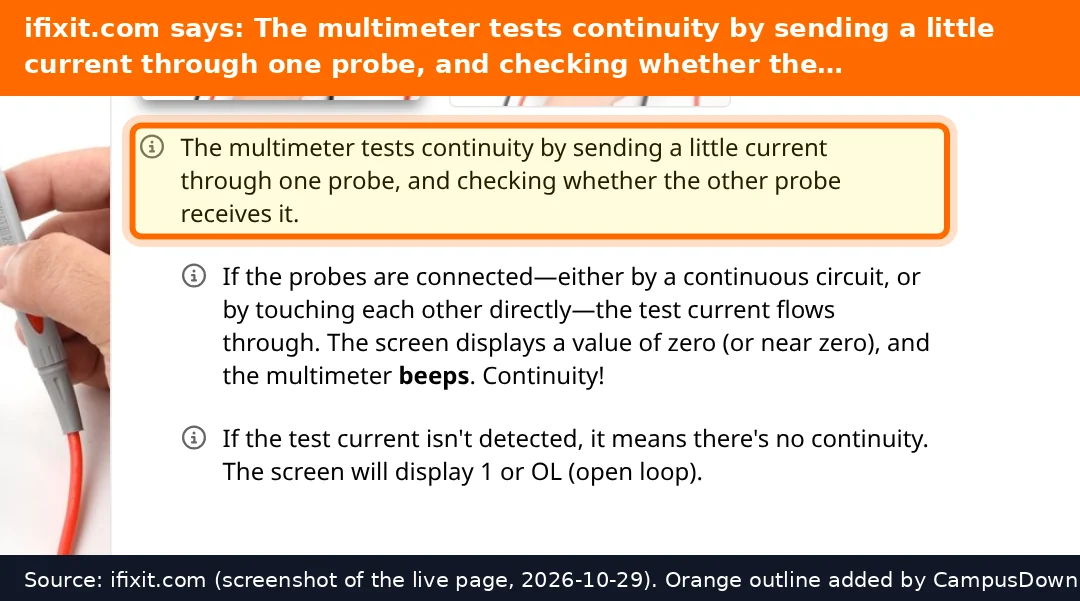
A continuity test tells you whether two points are electrically connected. In continuity mode (the icon that looks like a sound wave), the meter sends a little current out of one probe and checks if the other probe gets it. If the path is complete, the screen shows zero or close to it and the meter beeps. If there's a break, it shows 1 or OL, which stands for open loop.
That's how you'd check things like a suspicious fuse or a cable you think is broken inside, as long as it's unplugged. The guide notes that continuity doesn't care which probe goes where, with exceptions like diodes, which only pass current one way.
If your meter has no continuity mode, iFixit says you can use the lowest resistance setting instead. A reading near zero means continuity.
Test 2: DC voltage (like a battery)
For voltage, set the dial to DC voltage, shown as a V with a straight line. Put red on the positive terminal and black on the negative. An auto-ranging meter figures out the range itself. On a manual meter, if the range is too low you get 1 or OL, which won't hurt the meter; you just turn the dial up. Reversing the probes only gives you a negative number.
This is the fun beginner test: checking whether that drawer full of AA batteries is actually dead or just vibes-dead.
Test 3: resistance
Resistance is measured in ohms. Same rule as continuity: power off, unplugged, batteries out. iFixit points out you're measuring the whole circuit you touch, so a single component should be measured on its own. The relationship between voltage, current and resistance is Ohm's law, which is the one formula from physics class I now actually care about.
Why I'm not testing my outlet
I'll be honest: the original plan for this post was "test your outlet with a cheap meter." Then I read that iFixit's own beginner guide says AC voltage, the kind in your walls, is considerably more dangerous and beyond the scope of the guide. If an outlet in a rental is dead, sparking, warm, or buzzing, that's a maintenance request, not a science project.
That's the Dunning-Kruger effect in action. There's also the IKEA effect: you value stuff more when you made it yourself. That's sweet for a bookshelf, less sweet for an electrical panel. Stick to unplugged devices and batteries while you learn.
Found this helpful? Share it with a friend who’s dealing with the same mess.
Pick an app — it just sends the link, nothing else.
Frequently Asked Questions
What are the 3 basic multimeter tests?
iFixit's beginner guide covers continuity, DC voltage and resistance.
What does OL mean on a multimeter?
It means open loop or out of range: no continuity, or the range is set too low.
Do I unplug a device before testing continuity?
Yes. iFixit says switch it off, unplug it and remove batteries first.
Should a beginner test a wall outlet with a multimeter?
iFixit calls AC voltage much more dangerous; report outlet problems to your landlord or an electrician.