Contractor Comparison Worksheet
- Best for
- Homeowners collecting bids · Property managers
- When to use
- After you have two or more written estimates and need to compare them fairly, not just by the bottom line.
Download free
- Download PDF.pdf · 5 KB
- Download Excel.xlsx · 7 KB
No sign-up or email needed. Free for personal and business use; please don't resell the file itself.
How to use this worksheet
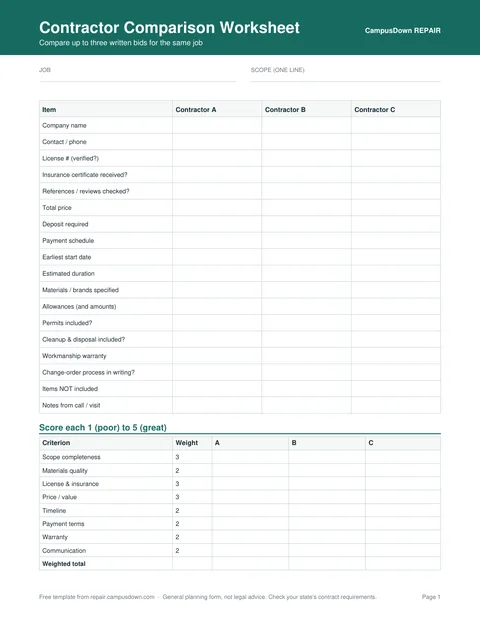
- Write the job name and a one-line scope at the top so every bid is measured against the same thing.
- Enter each contractor's details: company, contact, license number and insurance.
- Copy the price, payment schedule, timeline, warranty and materials straight from each written estimate.
- Mark anything a bid leaves out. A missing item is often why one price looks much lower.
- Score each contractor 1–5 on the criteria. In the Excel version, the weighted total updates automatically, and you can change the weights.
- Use the notes column for impressions from calls and site visits, then decide.
What's inside
- Side-by-side columns for three contractors
- Rows for license, insurance, references, price, deposit, payment schedule, start date, duration, warranty, materials and exclusions
- A simple 1–5 scoring table with adjustable weights (Excel)
- A checklist of questions to ask every contractor
Why price alone is misleading
Two bids for “replace the bathroom vanity” can mean very different jobs: one includes a new faucet, shutoff valves and haul-away; the other assumes you buy the fixtures. Line the scope up first, then compare the price. Our guide on how to compare contractor estimates walks through this step by step.
Note: How to verify a contractor's license depends on your state. Your state's contractor licensing board usually has a free online lookup.
Your Next Helpful Step
GuideHow to Compare Contractor EstimatesLine up scope, materials, license, insurance and payment terms.Free templateHome Repair Estimate TemplateLine items, labor, materials, tax and terms. PDF + Excel.CalculatorHome Repair Budget CalculatorAdd line items, a contingency and see a monthly savings goal.